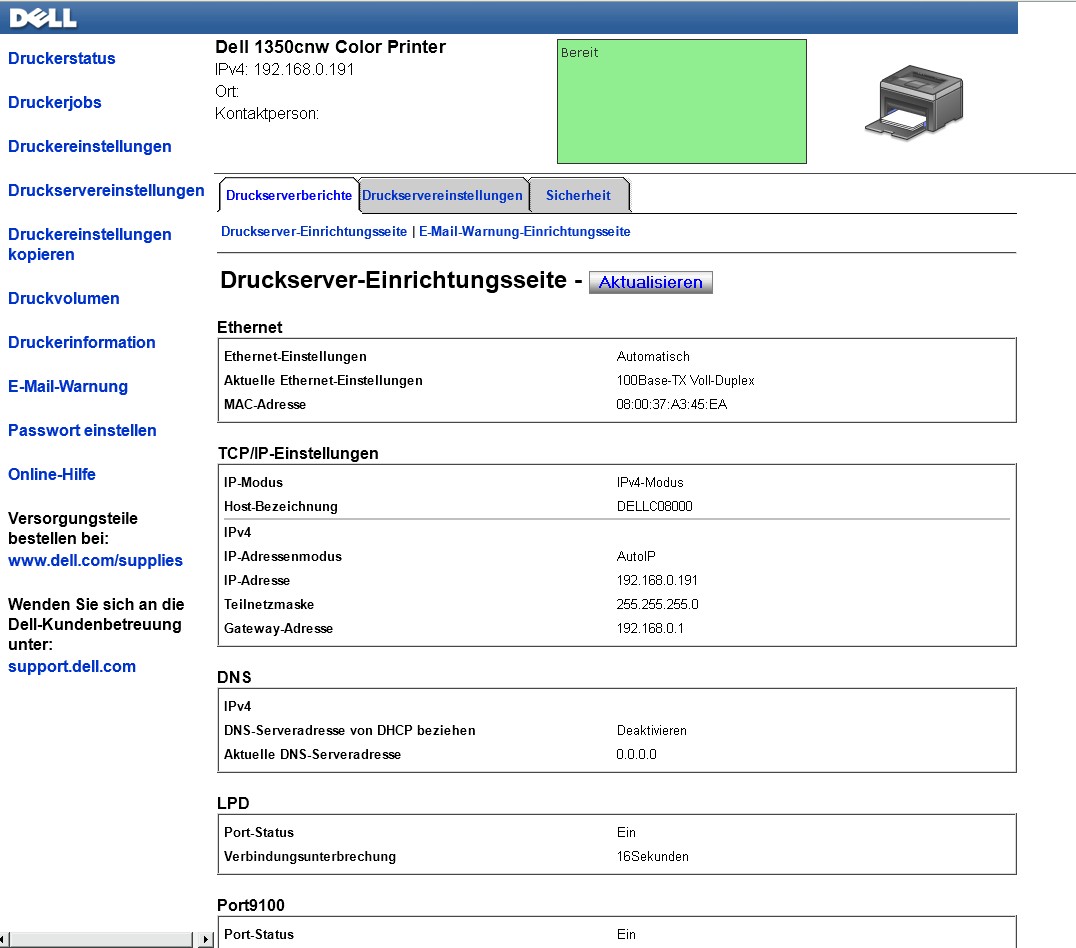
DELL-1350-cnw-printer-how-to-find-MAC-Adress
I spend half a day, trying to set up a DELL 1350cnw printer in a network. My network starts with a router, and from there all hardware is cable connected to the router. Also the new printer. My router uses MAC address filtering for safety, so no nobody can plug in an unauthorized device.
So first I need to enter the MAC address in my router.
BUT WHERE IS THE MAC ADDRESS of the DELL1350 cnw printer?
It is not labeled on the printer anywhere.
Now I have a problem, because the router doesn't let the printer on the Network without me telling the MAC address, BUT when its not on the Network I can't read the MAC address from the printer. O man, that makes me feel like Dilbert.
Well I am not stupid. There is the little blue menu screen of the printer. After hacking on that screen I found some IP address related settings. Like Ipv4, IPv6... No idea what that is. Glad it wasn't messed up after opening all the little menus.....BUT I see no MAC address there.
Well I decide to install the printer from the CD anyway, and see where it stops, and take it from there.
After doing, comes a window from which lets me extract the MAC Address from the printer. "Just give the IP address of the device first". (It even tells me I can look that up from the printer menu).
Well, I am getting too old for this. I hack once again through all the options if the little printer screen, but still no IP address
So here we are, without IP Address, and without IP address I can't look up the MAC address Without the MAC address I can't get the printer on the network, and when it's not on the network, I can't install it.
(The laughing you hear in the other room, that is Dilbert, he has always fun about me)
Since I have to move on with my normal work, I gave up on it, and decided to install it locally for USB only.
But by surprise that created the solution!
So here we go for the USB installation.
I plug in the USB Cable.... My computer says"Bingggg....". That sounds promising.
I expected something to happen now, but the only thing that happens is "Bingggg." when I plug it in, and "Boinggg" when I unplug it.
Mmmm. What now, Dilbert....?
Do I have to install a USB driver Perhaps? Yes.. I decide that must be it.
So.... I deleted the whole network stuff I just installed before. That is not USB software, right?
It may look so simple, but believe me or not, the above took me four hours of trying out network cables, installing and re-installing, and re-booting the PC.
After the network driver was deleted, WINDOWS complains about a missing USB driver right away. A little yellow box pops up. It starts to get dimmer before I can read all of it. Like it is disappearing soon. In a flash moment I decided to click on it. It responds with a question:
"Do you want to install the missing driver it from the Microsoft site?" I said "no" because I wanted to read the dialog boxes first. But it was too late, the install started to running from the Microsoft site. I tried to stop it, but before I know what was going on, it was already finished.
Now LOOK WHAT HAPPENS!!
Without me doing anything, Windows 7 pulls out the IP address FROM THE PRINTER.
It enters that in a browser window (I didn't know that makes sense, but boy it does!)
Now it opens directly from the printer a screen with ALL INFORMATION. MAC Address, IP address, Sub mask and whatever things you need or don't need, it's all there.
With this it could be solved.
So my advice is, when you buy a DELL 1350cnw printer
enter in your Browser window: 192.168.0.191
and you can take it from there.
Here is additional option I found later:
Open the dos box (Start -> all programs -> accesories ) and enter: ipconfig/all